Hyundai Tucson Hybrid Dashboard Symbols: What Each Light Means and What to Do
You press the start button on your Tucson Hybrid. The cluster lights up, a green READY appears, and the engine stays completely silent.
Is something wrong? Nope. That’s normal for this car.
A minute later, a yellow brake-looking symbol pops up that you’ve never seen before. Now you’re Googling in a parking lot.
This guide goes symbol by symbol through the lights you’ll see on the current-generation (NX4) Hyundai Tucson Hybrid.
In the US that’s the 2022 model year and newer. Each symbol gets three things: what it looks like, what it means, and what you should actually do.
A quick note on sources. Most of the meanings below come from Hyundai’s Tucson Hybrid owner’s manual.
The PDF that circulates online is often a non-US market version, so wording and a few symbols can differ from your car.
Your US manual lives on Hyundai’s owner site and is worth bookmarking.
First, the Color Rule
Hyundai follows the same color logic as most automakers:
- Red: Stop soon or don’t drive. Safety or serious mechanical risk.
- Yellow/amber: Something needs attention or a system is limited. Get it checked.
- Green/blue/white: Information only. A system is on or working.
If you remember nothing else, remember the colors.
The Tucson Hybrid Dash Symbols
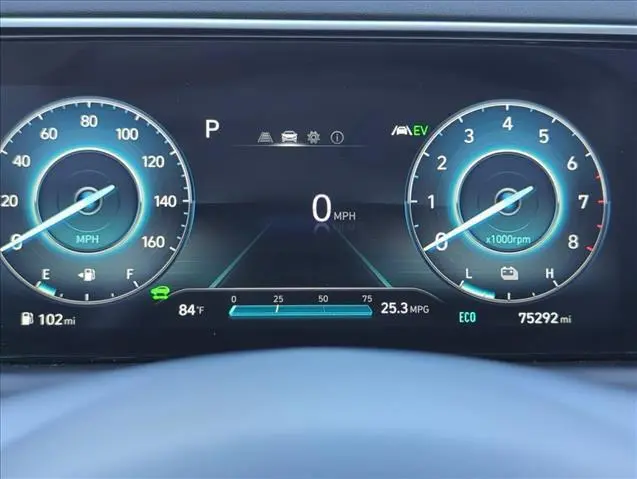
READY Indicator (Green)
Looks like: The word READY.
Means: When it’s on and steady, the hybrid system is on and the car will move when you select a gear. The gas engine may not be running at all.
There’s a second meaning most people don’t know about. According to the owner’s manual, if the vehicle has a malfunction, the READY indicator goes off or blinks. So READY isn’t just a “car is on” light. It also doubles as a fault signal for the hybrid system.
Do this
- Steady READY: Nothing. Just know that silence is not a stall. Always shift to P and press the start button to fully shut down before walking away. A silent hybrid left in READY is easy to forget.
- READY goes off or blinks: Hyundai’s manual recommends having the vehicle inspected and repaired by a Hyundai dealer. If it happens while you’re driving, pull over when it’s safe and check the cluster for other warnings or messages before deciding whether to drive on or call for a tow.
EV Mode Indicator (Green)
Looks like: The letters EV.
Means: You’re moving on electric power alone. The engine is off.
Do this: Nothing. You’ll see it most in parking lots, slow traffic, and light cruising. According to the owner’s manual, the engine can still kick on at any time if the system needs more power, heat, or battery charge.
Hybrid System Warning / Service Light (Yellow)
Looks like: A wrench or “Service” style icon, often paired with a “Check hybrid system” message on the cluster.
Means: A fault in the hybrid system: high-voltage battery, motor, inverter, or related controls.
Do this: Pull over when safe, shut the car off, wait a minute, and restart. If it comes back, drive gently to a Hyundai dealer. Don’t ignore this one. Hybrid components are covered by Hyundai’s hybrid warranty (10 years/100,000 miles for the original owner ), so a dealer visit is the smart move here, not a corner shop.
Power Down Warning (Yellow)
Looks like: Hyundai uses a turtle-style symbol on some electrified models.
Means: The system is limiting power to protect itself. Common triggers are a hot or cold high-voltage battery or a hybrid system fault.
Do this: Expect weak acceleration. Avoid merging onto highways if you can. If it clears after the battery warms up or cools down, keep an eye on it. If it stays, book a dealer visit.
Regenerative Brake Warning (Yellow)
Looks like: A yellow brake circle symbol, separate from the red BRAKE light.
Means: Regenerative braking isn’t working properly. Your hydraulic brakes still work.
Do this: You can drive, but the pedal may feel different and fuel economy will drop. Get it scanned. Don’t confuse this with the red brake light, which is far more serious.
Red Lights: Stop or Act Now
Brake System / Parking Brake Warning
Looks like: A circle with an exclamation point, or the word BRAKE.
Means: Either the parking brake is applied, brake fluid is low, or there’s a brake system fault.
Do this: First, confirm the electronic parking brake is released. If the light stays on while driving, pull over safely. Check the brake fluid reservoir under the hood. Low fluid on a car with good pads can mean a leak. Don’t keep driving on a red brake light.
Engine Oil Pressure
Looks like: An old-school oil can with a drip.
Means: Oil pressure is too low.
Do this: Stop as soon as it’s safe and shut the engine off. Check the dipstick. The 1.6L turbo in the Tucson Hybrid holds roughly 4.5 to 4.8 quarts with a filter change. Driving with this light on is how engines get destroyed. If oil is full and the light stays on, tow it.
Charging System Warning
Looks like: A battery symbol with + and – marks.
Means: On a regular car this points to the alternator. The Tucson Hybrid doesn’t have a conventional alternator. The 12V system is fed from the high-voltage battery through a DC-DC converter (Hyundai calls it the LDC). So this light usually means a 12V charging problem or a converter fault.
Do this: Turn off non-essential electrical loads and head to a dealer. If the 12V system dies, the car won’t power up even with a healthy hybrid battery.
Air Bag Warning
Looks like: A seated person with a circle (air bag) in front.
Means: A fault in the airbag or seat belt pretensioner system. It should come on briefly at startup and go out.
Do this: The car drives fine, but airbags may not deploy in a crash. Get it fixed quickly, especially if you carry kids or passengers.
Seat Belt Reminder
Looks like: A person wearing a seat belt.
Do this: Buckle up. If it stays on with everyone buckled, check for a bag or backpack on the passenger seat triggering the occupant sensor.
Electric Power Steering (EPS)
Looks like: A steering wheel with an exclamation point.
Means: Fault in the power steering system.
Do this: Steering may get heavy. Drive slowly to a safe spot, restart, and if it stays on, get it checked. Low 12V voltage can sometimes trigger this one too.
Yellow Lights: Get It Checked
Check Engine Light (MIL)
Looks like: An engine outline.
Means: The engine or emissions system logged a fault.
Do this:
- Steady: Safe to drive. Tighten the gas cap and get the code read.
- Flashing: Misfire. Reduce speed and get it checked soon. A flashing light can overheat the catalytic converter.
ABS Warning
Looks like: ABS inside a circle.
Means: Anti-lock braking is disabled. Normal braking still works.
Do this: Drive gently and leave extra room, especially in rain or snow. A bad wheel speed sensor is a common cause on many cars.
ESC and ESC OFF
Looks like: A car with squiggly lines behind it. ESC OFF adds the word OFF.
Means:
- Flashing: ESC is actively working. Normal on slippery roads.
- Steady: System fault.
- ESC OFF: You or the system turned it off.
Do this: If it’s steady and you didn’t turn it off, get it scanned.
Electronic Parking Brake (EPB) Warning
Looks like: EPB, or a parking brake symbol with a wrench.
Means: A fault in the electronic parking brake.
Do this: The parking brake may not engage or release. Park in gear on flat ground and get it checked.
Tire Pressure (TPMS)
Looks like: A horseshoe shape with an exclamation point.
Means:
- Steady: One or more tires are low.
- Flashing for about a minute, then steady: TPMS system fault.
Do this: Check all four tires with a gauge. Use the pressure on the driver door jamb sticker, not the tire sidewall. Cold mornings trigger this light every fall. Air up and it should go out after a short drive.
AWD Warning
Looks like: AWD or a 4-wheel icon with a warning mark.
Means: A fault in the HTRAC AWD system, which is standard on US Tucson Hybrids. The car may fall back to front-wheel drive.
Do this: You can drive, but don’t count on AWD traction. If you live where it snows, get this sorted before winter. We cover what matters for winter traction in our guide to the best SUVs for snow.
Icy Road Warning
Looks like: A snowflake.
Means: Outside temperature is near freezing, around 39°F or lower.
Do this: Bridges and shaded spots freeze first. Slow down. It’s a reminder, not a fault.
Master Warning Light
Looks like: A triangle with an exclamation point.
Means: Check the cluster message. It covers things like low washer fluid, a lamp failure, or driver assist faults.
Do this: Read the message before reacting.
Low Fuel
Looks like: A gas pump.
Do this: Fill up soon. Hybrids still need gas. Don’t run it to empty. The fuel pump relies on fuel for cooling.
Driver Assist Warnings
You may see yellow versions of the Forward Collision-Avoidance Assist, Lane Keeping Assist, and Blind-Spot icons. Yellow usually means the system is off or limited.
The fix is often simple:
- Clean the front radar sensor behind the grille emblem.
- Clean the windshield in front of the camera.
- Clear snow, ice, or mud off the rear bumper corners.
If cleaning doesn’t help, a dealer may need to recalibrate, especially after a windshield replacement.
Green and Blue Lights: Just Information
- Turn signals: Green arrows. Fast blinking means a bulb is out (on cars with bulbs).
- High beam: Blue headlight icon.
- High Beam Assist: Headlight icon with “A,” on trims that have it.
- AUTO HOLD: White means ready, green means it’s holding the car at a stop.
- Smart Cruise Control: Shows when cruise is set.
- Downhill Brake Control: Green when active, flashing when working.
- Drive mode: Shows SPORT or ECO.
Model-Year Gotchas
2022 to 2024: The cluster depends on trim. Lower trims got a smaller display with gauges, while higher trims got the 10.25-inch digital cluster. Symbols are the same, but where they appear and how messages show up changes.
2025 refresh: Hyundai updated the interior with a larger standard screen and a column-mounted shifter. Some icons and messages were updated with the new software. Check your year’s manual, not a 2022 PDF.
If digital clusters are your thing, we compared them in cars with a digital instrument cluster.
Diagnostic Shortcuts by Symptom
Several lights came on at once (ABS, ESC, EPS, charging)? Suspect low 12V voltage first. Multiple modules throw warnings when voltage drops.
Light came on right after refueling? Check the gas cap for the check engine light.
TPMS on the first cold morning of the year? Almost always just low pressure from temperature drop.
Driver assist lights after a snowstorm? Clean the sensors before you panic.
DIY Scanner vs. Dealer: The Cost Math
- Free code read: Many auto parts stores in the US will read basic codes for free.
- Basic OBD2 scanner: About $20 to $40.
- Dealer diagnostic fee: Often around $150 to $200.
Here’s the nuance. A cheap generic scanner reads engine and emissions codes well. It often can’t read Hyundai-specific hybrid, airbag, ABS, or ESC module codes. For those you need a scanner with Hyundai coverage, or a dealer.
Verdict:
- Check engine light only: A cheap scanner or free parts store read makes sense.
- Hybrid system, airbag, or brake warnings: Go to the dealer. These are likely under warranty, and DIY guessing doesn’t pay.
If you’re still shopping for an efficient hybrid, see our picks for the best PHEV SUVs.
Frequently Asked Questions
That’s normal. When the green READY light is on, the car is ready to drive, and it often moves on electric power alone at low speeds. The gas engine starts automatically when the system needs more power, cabin heat, or battery charge.
You can usually drive it carefully a short distance, but you shouldn’t ignore it. Restart the car once. If the light returns, take it to a Hyundai dealer soon. Hybrid components are typically covered by Hyundai’s hybrid warranty, so a dealer diagnosis is usually the cheapest route.
It’s usually the regenerative brake warning. It means the energy-recovery part of braking isn’t working, but your normal hydraulic brakes still work. A red brake light is different and more serious. It can mean low brake fluid or a brake system fault.
Your Checklist for Today
- Download the US owner’s manual for your exact model year from Hyundai’s owner site.
- Learn the difference between the red BRAKE light and the yellow regen brake light.
- Check all four tire pressures against the door jamb sticker.
- Check engine oil level on the dipstick.
- Wipe the front radar emblem and windshield camera area.
- Keep a basic OBD2 scanner in the glovebox for check engine lights.
- Save your Hyundai dealer’s service number in your phone.